 Published by Michael Becker
Last updated on June 09, 2026
•
12 minute read
There's a gap that lives in almost every DevOps team, and it goes something like this: you've automated the pipeline, the deployments are running, the CI/CD is humming - and then something breaks in production and nobody knew until a user filed a ticket.
DevOps automation and integration has fundamentally changed how development teams and operations teams build and ship software. But automation without visibility is just faster failure. The tools that streamline your workflows - your CI/CD pipelines, your infrastructure provisioning, your automated testing frameworks - all need to be monitored just as carefully as the applications they deploy. And yet, monitoring is still the part that most teams treat as optional. It isn't.
This article covers six DevOps automation and integration best practices that span the full software development lifecycle (SDLC). Each one addresses a real pain point that DevOps teams face, and each one includes a monitoring angle - because knowing your automation is running is not the same as knowing it's working.
1. Automate Your CI/CD Pipeline End-to-End
Most teams think they've done this. They haven't - not fully.
What usually happens is that continuous integration is solid: source code gets pushed, tests run, a build kicks off. But then there's a human somewhere in the middle. Someone who has to approve the deployment. Someone who manually triggers the next stage. Someone who's on vacation when the pipeline stalls at 4pm on a Friday. Sound familiar?
True end-to-end CI/CD means the DevOps workflow runs - from the first commit to continuous deployment - without anyone needing to babysit it. Tools like GitHub Actions, Jenkins, and Azure DevOps make this possible. You define the pipeline as code, every code change triggers it automatically, and failures stop the process before anything broken reaches users.
This is also where DevOps automation tools earn their keep. Automating workflows end-to-end removes the repetitive tasks that slow teams down and introduce human error - manual approvals, status checks, and environment resets. The less humans touch the pipeline between commit and production environments, the more consistent and reliable the entire development process becomes. And when you finally eliminate those bottlenecks, release cycles get shorter in a way that actually sticks.
The part teams skip? Monitoring the pipeline itself. A deployment completing isn't the same as a deployment succeeding. PRTG's REST API sensors connect directly to your CI/CD toolchain, tracking build times, deployment frequency, failure rates, and queue depth in real-time. When something stalls or a deployment rate suddenly drops, you find out - not from a user ticket, but from an alert.

2. Use Infrastructure as Code for Consistent Provisioning
Ask any sysadmin who's inherited someone else's environment and they'll tell you the same thing: the scariest words in IT are "I think it was configured manually."
Manual provisioning works fine - until it doesn't. Configurations drift. The staging server that was supposed to mirror production has three packages at slightly different versions. Nobody knows when that happened or why. Something breaks, and the debugging process is basically archaeology. Configuration management becomes a guessing game.
Infrastructure as code (IaC) fixes this by making your infrastructure definitions explicit, version-controlled, and repeatable. Terraform, Ansible, Pulumi - pick your tool. The point is that your infrastructure is defined in files, reviewed like code, and provisioned the same way every single time. No more "works on my machine" for your servers. No more human error baked into the provisioning process.
IaC also makes scalability much more manageable. When you need to spin up ten environments instead of one, you run the same playbook ten times. Dependencies between services are declared explicitly, so there's no guesswork about what needs to exist before something else can be provisioned. Rollbacks are straightforward - if a code change causes a problem, you revert the code. And when something does go wrong, you have a clear history of what changed and when. That's version control working the way it's supposed to.
Where monitoring fits: PRTG integrates directly with Ansible, so sensor provisioning happens alongside your infrastructure. A new server spins up - PRTG starts monitoring it automatically. No manual sensor setup, no human error, no gaps in coverage.
3. Integrate Automated Testing at Every Stage
Having automated tests isn't the same as having automated testing integrated into your devops workflow. There's a big difference - and it's one that bites teams at the worst possible moment.
A lot of teams have a test suite that runs... somewhere. Maybe before a release. Maybe when someone remembers to trigger it. When testing only happens at the tail end of the software development lifecycle, you're catching bugs after the code is written, reviewed, merged, and sitting in a deployment queue. That's expensive. That's time-consuming. And honestly, it's avoidable.
Shifting testing left means embedding test automation throughout the pipeline, not bolting it on at the end. Unit tests on every commit. Integration tests on every merge. End-to-end tests before every deployment. Each layer catches something different, and catching it earlier is almost always cheaper and faster to fix.
And it's not just functional testing. Security scanning, dependency checks, performance benchmarks - these can all run as automated stages inside your CI/CD pipeline. A code change that quietly introduces vulnerabilities or a memory leak gets flagged before it ever touches production environments. This is essentially the DevSecOps methodology in practice: security and quality baked into the DevOps lifecycle, not added as an afterthought.
The frameworks and automation tools that support this - testing frameworks, pipeline runners, static analysis tools - work best when they're treated as first-class parts of the DevOps processes, not optional add-ons. The goal is to make automated processes the default so that manual intervention becomes the exception rather than the rule.
Where monitoring fits: Tests tell you whether your code does what it's supposed to. Application performance monitoring with PRTG tells you whether the deployed application is actually holding up under real conditions. Both matter - and neither replaces the other.
4. Centralize Monitoring Across Your Entire DevOps Toolchain
Count the dashboards your team has open during an incident. If the answer is more than two, you have a problem.
This is one of the most consistent frustrations for DevOps teams: the toolchain is fragmented. There's a dashboard for the CI/CD platform, another for Kubernetes, another for Docker containers, another for the cloud provider, and maybe a separate one for application performance. Each tool has its own definition of "healthy." None of them talk to each other. Silos, basically - just in monitoring form.
So when something goes wrong - and something always goes wrong - your operations teams are tabbing between five consoles trying to figure out if the Kubernetes pod restart caused the API latency spike or if the latency spike caused the pod restart. By the time they've pieced it together, the incident has already escalated. That's a visibility problem, not a technical one.
Centralizing your monitoring means pulling all of those signals - infrastructure metrics, DevOps pipeline status, application performance data, and cloud resource utilization - into one place. Not for convenience. For context. Because a metric without context is just noise. Observability isn't just about having data; it's about having data that means something.
This is especially important as devops teams grow and development teams and operations teams start to overlap. A shared monitoring view means shared situational awareness - everyone sees the same data, in real-time, without needing to translate between tools. It also makes it much easier to optimize incident response, because you're not spending the first ten minutes of an outage just figuring out where to look.
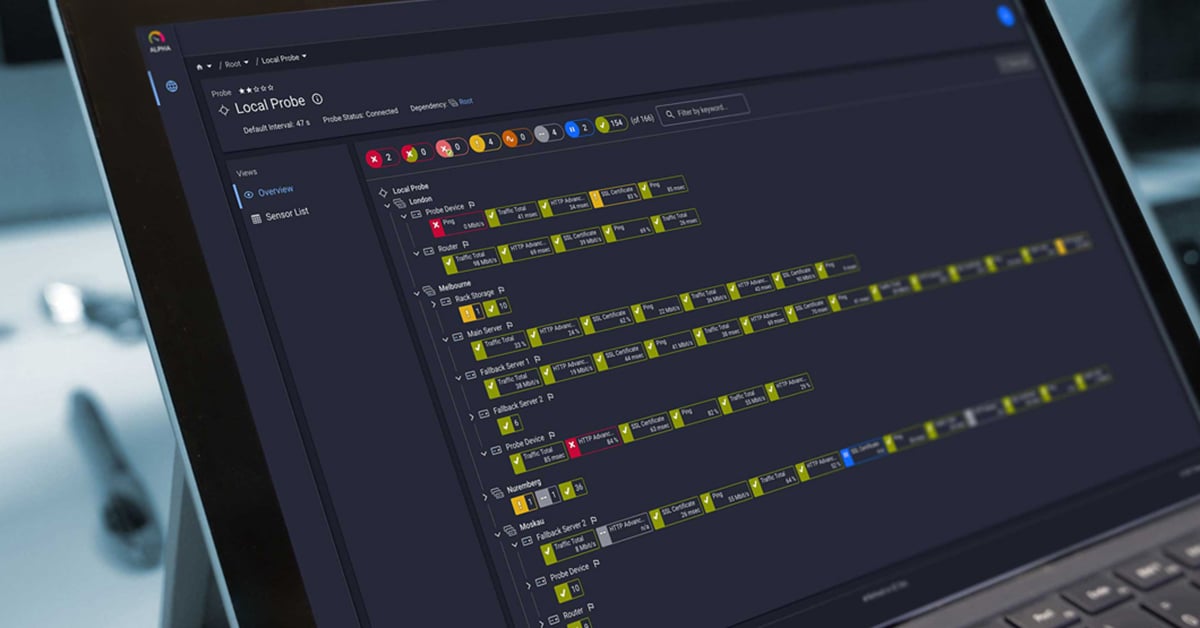
Where monitoring fits: PRTG gives DevOps and IT operations teams a single dashboard that spans on-prem infrastructure, cloud environments, and application layers. Real-time metrics across the entire stack, in one view - so when something breaks, you're not starting from scratch.
5. Automate Alerting and Incident Response
There are two ways alerting goes wrong, and most teams have experienced both.
⚠️ The first: no alerts, or the wrong ones. The CI/CD pipeline reports green. The deployment went through. But the application is quietly returning errors, response times have crept up, and a critical service is degraded. Nobody gets paged because nobody configured an alert for that specific failure mode. You find out when a customer complains - and by then, downtime has already happened.
⚠️ The second: too many alerts. Thresholds set too low, too many systems reporting, too much noise. The team starts ignoring pages. When everything is urgent, nothing is - and the one alert that actually matters gets buried in the flood of notifications.
Both problems come from the same place: alerting that's been treated as an afterthought rather than a core part of the automation workflow. Good alerting is specific, threshold-based, and routed to the right person with enough context to act immediately. Repetitive tasks - restarting a failed service, clearing a log queue - should be handled by automated remediation scripts, not a 2am page to an on-call engineer. That's what it means to actually automate tasks instead of just automating deployments.
The goal is to streamline incident response so that human intervention is reserved for decisions that actually require human judgment. Everything else - detection, notification, initial triage, common fixes - should be automated. That's what separates DevOps practices that scale from ones that burn out the team.
Where monitoring fits: PRTG's alerting engine connects to ticketing systems and ITSM tools, so notifications arrive with context, not just a raw threshold breach. The right team, the right channel, the right information - automatically.
6. Monitor Cloud Infrastructure and DevOps Pipelines Together
Cloud environments break traditional monitoring assumptions. On-prem infrastructure is mostly static - you know what servers you have, you configure sensors for them, done. Cloud infrastructure is the opposite. Auto-scaling groups spin up and terminate instances based on load. Containers are ephemeral by design. Serverless functions execute in milliseconds and disappear. If your monitoring approach requires you to manually configure a sensor for each resource, you're already behind.
DevOps teams running workloads in Azure, AWS, or GCP need cloud-native monitoring that keeps up - auto-discovery of new resources, native integration with cloud provider APIs, and the ability to see cloud metrics alongside what's happening in the CI/CD pipeline and on-prem environment at the same time. Docker and Kubernetes orchestration add another layer: container health, resource consumption, and pod restarts all need to be visible alongside the infrastructure they run on.
Microsoft Azure in particular has become a common home for DevOps pipelines - Azure DevOps for CI/CD, Azure Kubernetes Service for container orchestration, Azure Monitor for... some of it. The problem is that "some of it" isn't good enough when you need a complete picture. Cloud-native monitoring tools tend to cover their own platform well and everything else poorly. That's a gap that matters when your software delivery spans multiple environments.
Here's why that last part matters: a spike in Azure VM CPU utilization is a very different problem depending on context. If it coincides with a new deployment, it's probably worth investigating. If it appears out of nowhere on a Sunday morning with no pipeline activity, that's a different conversation entirely. Raw metrics without pipeline context are just numbers. Continuous delivery pipelines that push to cloud environments need monitoring that understands both sides - the deployment process and the infrastructure it's deploying to. That's what closes the loop between your devops lifecycle and your IT operations.
Where monitoring fits: PRTG's native sensors for Azure, AWS, and GCP bring cloud infrastructure visibility into the same dashboard as your on-prem environment. Auto-discovery keeps pace with dynamic cloud resources, and pipeline events sit alongside infrastructure metrics - so the context is always there when you need it.
Start Monitoring Your DevOps Automation - Not Just What It Deploys
DevOps automation and integration is about more than speed. It's about confidence - confidence that your CI/CD pipelines are running cleanly, your infrastructure is provisioned consistently, your tests are catching real problems, and your team will know before users do when something goes wrong.
The six best practices above cover the full DevOps automation lifecycle. But they share a common thread: at every stage, from continuous integration to cloud provisioning, visibility matters as much as the automation itself. Automated processes that run without monitoring are a liability, not an asset. And in environments where business goals depend on high-quality software delivery, that's not a risk worth taking.
PRTG gives DevOps and operations teams a single platform to monitor the infrastructure, cloud environments, applications, and pipelines that their automation depends on - in real-time, with the context needed to act fast.

Or explore 4 essential steps to building a successful IT infrastructure monitoring strategy to go deeper on monitoring foundations.


 You there!