 Published by Michael Becker
Last updated on July 08, 2026
•
7 minute read
Quick question. When was the last time anyone on the team actually read a monitoring alert, word for word, before dismissing it? Not skimmed. Read.
Take a second with that one. If the honest answer is "can't remember," alert fatigue has already moved in. It doesn't show up with some dramatic outage or a red banner screaming for attention. It's quieter than that, and slower. Hundreds of small, forgettable pings, week after week, and then one random Tuesday someone realizes nobody on the team trusts the alert system anymore. They just click things away. Swipe, dismiss, next.

Alert fatigue isn't caused by one bad tool, or one admin having a rough month. It's what happens to basically any team, sharp or not, once notification volume outpaces what a human brain can reasonably sort through. And in IT, that volume only really moves one direction. Up. Always up.
What Exactly Is Alert Fatigue?
So, what is it exactly. Alert fatigue is what happens when people get exposed to so many notifications that they start tuning them out, including the ones that actually matter. The term originated in healthcare, oddly enough, where it's called alarm fatigue, describing clinicians who stopped reacting to the constant beeping of medical monitors. Same brain, same wiring, just playing out in server rooms and SOCs now instead of hospital wards.
Not a personal failing, worth repeating that. It's what happens to pretty much any human brain under sustained, repetitive stimulation, full stop. The numbers back this up, and honestly they're a bit much to sit with. Security teams report anywhere from several hundred to several thousand alerts a day. Some studies put the share that never get investigated at all somewhere between 40 and 60 percent. Sit with that for a second. Nearly half, sometimes more, just sitting there. Unlooked at. Unread.
That's not a minor inefficiency, that's a structural crack running through the whole operation. And it costs more than missed threats. It shows up as burnout too, plain and simple. Analyst burnout and high turnover in security operations are well documented by now, and plenty of organizations report that more than half their security staff feel real, measurable stress tied directly to alert volume. Makes sense. Nobody applies for an IT job dreaming about eight hours of clicking "dismiss."
Why Does This Happen in the First Place?
A few things tend to stack on each other here, and anyone who's worked in IT for more than a year has probably run into all three, maybe this week even:
⚠️ Tool sprawl - a network monitoring tool over here, a SIEM platform over there, three different firewalls, each with its own alert logic and its own opinion of what "urgent" means
⚠️ False positives and false negatives - alerts flagging something harmless, or worse, missing something real, which quietly wrecks trust in the entire system
⚠️ No real severity levels, just redundant alerts stacked on redundant alerts - when everything looks equally urgent, nothing actually is
Here's the part that gets interesting, or frustrating, depending on the day. The line between "IT infrastructure monitoring" and "security operations" blurs fast once alert volume gets involved. Whether it's threat detection running in a SOC, or just a network monitoring tool screaming about every tiny blip on a Tuesday afternoon, the underlying mechanic is identical. Too much noise. Not enough signal. A widening gap between what the system reports and what a human can realistically act on.
Threat intelligence platforms, machine learning based anomaly detection, agentic AI, all of it gets pitched these days as the fix for security teams drowning in alert storming. And fair enough, automation genuinely helps cut down manual triage in a SOC. But for a lot of IT departments, the problem doesn't actually start with some sophisticated attack. It starts much closer to home. A server room. A storage array. A handful of switches, all configured straight out of the box to yell about everything, all the time, whether it matters or not.
Your infrastructure shouldn't be the reason your team burns out. Download PRTG's free trial and see how proper alerting actually feels.

Where PRTG Fits Into the Picture
One thing needs saying upfront. PRTG Network Monitor is not a SIEM. It's not replacing a security operations center, and it's not stepping into threat hunting workflows either. What it does handle, and handles well, is something that gets overlooked constantly: making sure the alerts infrastructure monitoring actually produces are worth someone's attention in the first place.
Nobody mentions this part when rolling out a new monitoring tool for the first time, but the default settings will bury a team within a week. Every sensor screaming the instant it sniffs a threshold breach isn't monitoring. That's just noise wearing a lab coat.
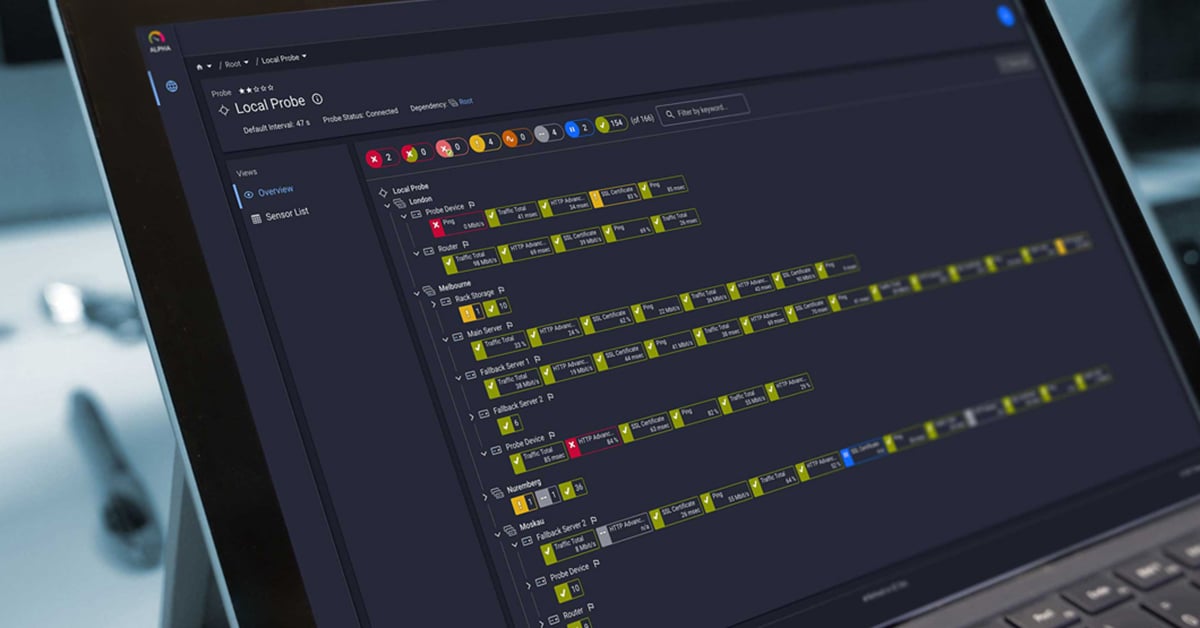
PRTG handles this differently. With customizable notifications and alerts, admins decide what's worth a message at 2 a.m. and what can comfortably wait until Monday's first coffee. Threshold monitoring means limits get set based on the actual environment, not some generic factory default somebody guessed at years ago. And dependency mapping means that when a core switch drops, there's one alert about the switch. Not two hundred redundant alerts about every device sitting behind it, clogging the inbox for the next hour.
A few concrete ways this plays out day to day:
🧩 Priority and severity settings, so critical issues stand out from routine fluctuations instead of blending into the noise
🧩 Escalation levels, notifying the right person only once an issue actually sticks around, cutting down hard on premature pings
🧩 One dashboard covering network, server, and application monitoring together, chipping away at the tool sprawl fragmenting the alert picture to begin with
None of this touches security posture directly, worth being upfront about that. But it does something arguably just as important for everyone's day to day sanity. It restores trust in the alerts themselves. When a notification lands, a team should be able to assume it actually matters, not roll its eyes and move on. That kind of trust is worth more than any dashboard, however nice it looks.
Ready to stop drowning in alerts that don't matter? Start your free PRTG trial and give the team's attention back to what actually counts.

A Realistic Take on the Threat Landscape
It would be dishonest to pretend fixing infrastructure alerting solves everything, so no pretending here. Data breaches, security breaches, evolving security threats, these still need dedicated tools, risk scoring frameworks, and often managed detection and response (MDR) services or a proper SOC setup behind them. Anyone dealing with incident response at the level of threat intelligence correlation is working outside what PRTG covers. It never claimed otherwise.
What PRTG does is take one meaningful source of noise off the table, and that's not nothing. Infrastructure related alert fatigue, caused by misconfigured thresholds, duplicate notifications, and tool sprawl across the network monitoring stack, is fixable. Genuinely fixable, and often faster than expected once someone actually sits down and tunes the thing properly instead of leaving it on autopilot for three years.
Once infrastructure alerts are trustworthy again, the team has more mental bandwidth left over for whatever genuinely needs deep investigation, wherever that comes from. Reducing mean time to resolution (MTTR) starts with knowing which alert to even glance at first. That's not really a security capability when it comes down to it. That's just good monitoring hygiene, the unglamorous kind that pays off quietly, every single day, without anyone throwing it a parade.


 You there!