 Published by Michael Becker
Last updated on July 16, 2026
•
8 minute read
We just released PRTG version 26.1.118 to the stable release channel - and this one is packed. The highlight of this release is the first Beta of PRTG Database, a brand-new PostgreSQL-based storage layer designed to boost efficiency and speed in large PRTG installations. On top of that, you get two new experimental sensors for Proxmox VE, the new SNMP Windows Service v2 sensor, a rewritten SSL/TLS Security Check sensor, WSMan protocol support for WMI connections, and a range of further improvements across the board.
Here are the highlights:
🗄️ Introducing PRTG Database (BETA)
This release marks a significant milestone: the first Beta of PRTG Database. Built on PostgreSQL, it is designed as an alternative to the traditional file system storage and brings better efficiency and speed to PRTG - especially in large installations with many sensors and data points.
When you update to version 26.1.118, PRTG Database will install its files and components automatically. However, it is deactivated by default, so you stay in full control of when you want to switch.
A few things to keep in mind for this first Beta release:
- If you run a Cluster setup, PRTG Database will be installed successfully - but you cannot activate it yet in this first Beta release
- You cannot install the PRTG core server on a system that already has a database (such as PostgreSQL) installed - the installer will inform you of this with an error message
- If you run a Cluster setup and update to version 26.1.118, you may need to start the PRTG services manually after the update
Along with PRTG Database, PRTG will automatically create a new Database Health (Autonomous) sensor within the PRTG Core Server group. This sensor monitors the PRTG Database service and reports an error if the service is not running.
🧩 New and experimental sensors
New: SNMP Windows Service v2 sensor
The SNMP Windows Service v2 sensor is the successor to the SNMP Windows Service sensor, completely rewritten from the ground up. It monitors a Windows service via SNMP and delivers improved reliability and maintainability compared to its predecessor.
Experimental: SSL/TLS Security Check sensor (BETA)
The new SSL/TLS Security Check sensor replaces the older SSL Security Check sensor and brings full support for modern protocols - including TLS 1.3, which the old sensor did not support. By default, TLS 1.2 and TLS 1.3 are set as accepted, while weaker protocols like SSL 3.0, TLS 1.0, and TLS 1.1 are set to denied. This gives you a much more up-to-date picture of the security of your encrypted connections.
Experimental: Proxmox VE Node Performance sensor (BETA)
The new Proxmox VE Node Performance sensor monitors performance metrics and the status of Proxmox VE host nodes. To get started, make sure to enter and save the credentials for Proxmox in the device settings with API token authentication.
Experimental: Proxmox VE Cluster Health sensor (BETA)
The Proxmox VE Cluster Health sensor monitors the health status of your Proxmox VE clusters. Available channels include Quorum Reached, Active Nodes, Online Nodes, and Total Nodes. If you have a Ceph file system configured, an optional Ceph Status channel is also available.
Experimental: SIMATIC S7-300/400 LED Status sensor (BETA)
The SIMATIC S7-300/400 LED Status sensor displays the status of all physical LEDs on the front panel of a SIMATIC S7-300 or S7-400 controller. The sensor automatically creates one channel per LED available on the monitored PLC model and maps the LED status to human-readable messages via lookup values.
🔒 Security improvements
With this release, we improved the authentication implementation of PRTG to defend against potential timing attacks. This improvement is part of our ongoing effort to keep your PRTG installation as secure as possible.
⚙️ WSMan protocol support for WMI connections
As part of the ongoing NTLM deprecation process from Microsoft, we have added a first iteration of Kerberos support for WMI sensors. In the Probe Settings for Monitoring, you will now find an additional option to Use WSMan for WMI connections. DCOM remains the default, but you can switch to WSMan on a per-probe basis.
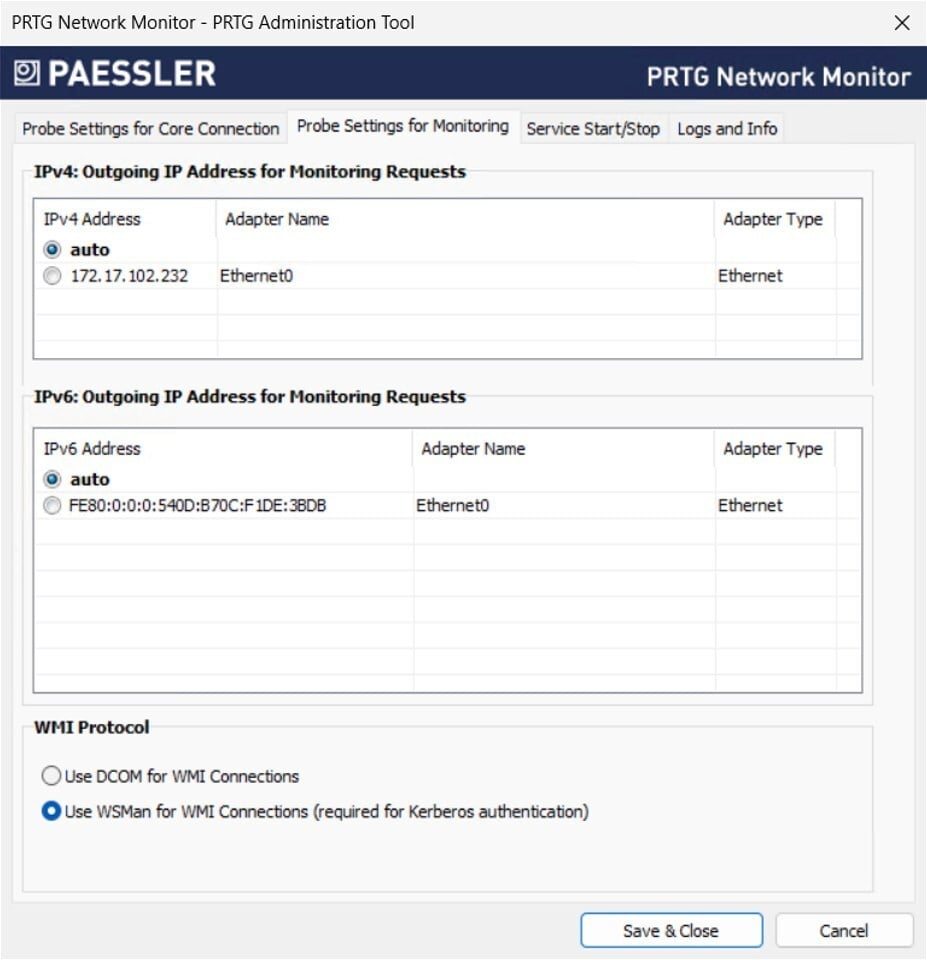 Once WSMan is active on the probe, you can select the WMI Authentication Method in the Credentials for Windows Systems settings:
- Only Kerberos - PRTG will establish the connection exclusively using Kerberos authentication
- Negotiate (Kerberos, Fallback to NTLM) - PRTG will try Kerberos first and fall back to NTLM if needed
🌐 New UI improvements
Improved License Status Widget
The License Status Widget on the welcome page has been updated. Instead of showing a potentially inaccurate sensor count in the classic web interface, you will now see a direct link to the New UI - where you get a transparent and consistent overview of your sensor usage and maintenance days left.
⚠️ Note that this link is only visible if you have enabled the New UI and API v2.
New Comments tab
You can now enter and save notes directly in a new Comments tab on Device, Probe, Group, and Sensor level. This makes it much easier to keep track of important information right where you need it.
📡 PRTG API v2 enhancements
We have expanded the /experimental/devices/{id}/sensor endpoint with support for additional sensor types, including the SSH Disk Free v2 sensor, which you can now create via POST request.
🗒️ Check our PRTG release notes
In summary, PRTG 26.1.118 includes 125 resolved issues, including 18 implemented features and stories, 35 bug fixes, 37 completed tasks & to-dos, and 37 finished documentation tickets. For all the details, take a look at our release notes page.
We also offer a public roadmap of PRTG on our website, which we update regularly. There you can read which features we are currently working on and what kind of things we want to implement in PRTG in the future.


 You there!